What a pleasant surprise it was for me when I read through my emails to find this article about the Idaho Ed Board voting to require two credits online to help students prepare for college while saving money. Idaho will be the first state to require two credits online, joining three other states that currently require one online course for graduation: Alabama, Florida & Michigan. I wonder when the State of HI Board of Ed will revisit the bill from 2010.
ASCD link to Idaho Statesman/Associate Press, http://www.idahostatesman.com/2011/09/09/1792606/idaho-ed-board-votes-to-require.html.
Monday, September 12, 2011


Monday, August 1, 2011
Missouri Outlaws Teacher-Student Facebook Friendship
This is the first time I've heard of legislature implementing particular restrictionns related to social media for teachers and students.
According to this Atlantic Wire article,a Senate bill 54 was passed by Governor Jay Nixon and states "Teachers cannot establish, maintain, or use a work-related website unless it is available to school administrators and the child's legal custodian, physical custodian, or legal guardian. Teachers also cannot have a nonwork-related website that allows exclusive access with a current or former student."
Additional details & link to the article, http://www.theatlanticwire.com/technology/2011/07/missouri-outlaws-teachers-and-students-being-facebook-friends/40626/.
According to this Atlantic Wire article,a Senate bill 54 was passed by Governor Jay Nixon and states "Teachers cannot establish, maintain, or use a work-related website unless it is available to school administrators and the child's legal custodian, physical custodian, or legal guardian. Teachers also cannot have a nonwork-related website that allows exclusive access with a current or former student."
Additional details & link to the article, http://www.theatlanticwire.com/technology/2011/07/missouri-outlaws-teachers-and-students-being-facebook-friends/40626/.
Tuesday, July 26, 2011
Exploring Google+

I received a Google+ invitation from Brent and decided to spend some time exploring it. Google+ (Facebook's competitor) is currently open on an invitation basis, so if you'd like an invite, please let me know. Here are my thoughts after exploring for the first 2 days.
- Pretty simple interface to use.
- I like how it connects directly to my Picasa album and pulls in contacts directly from my Google mail account.
- The "circles" concept of providing relevant content (multiple privacy layers) depending on your personalized categories.
- The "sparks" and "hangout" features looked interesting, but I didn't have a chance to explore yet.
Potential to become useful if it appeals to the masses like Facebook and LinkedIn, but it will probably take awhile since most people are currently using more popular social media sites.
- Google Plus and Education, http://learningedtech.wordpress.com/2011/07/01/google-plus-and-education/.
- Google Plus: The Good, The Bad, The Potential, >http://alisterpaine.info/2011/07/25/google-plus-the-good-the-bad-the-potential/
New to Mobile Learning Course Development Webinar
In my attempt to keep up with online  learning trends, I attended a mobile learning Webinar to hear more about mobile learning development for instruction. I found this Webinar useful for my needs. Here are some of my take-aways.
 learning trends, I attended a mobile learning Webinar to hear more about mobile learning development for instruction. I found this Webinar useful for my needs. Here are some of my take-aways.
- Mobile learning is "here" and growing nationally at 18%. Garin Hess advised that if we're thinking of diving in, don't wait too much longer. After yesterday's Bb World share out, it seems that mobile learning is definitely something we need to take a closer look at. I can't wait for Bb Mobile Learn to be installed onto our enterprise server.
- There are 3 big problems when diving into mobile learning development
- How do I create content? Ensure you have cross-platform support.
- How will learners access mobile content? Provide it through a native stand-alone app offline, native mobile learning management offline OR directly from a learning management system (LMS) which seems to be the main solution.
- How do I track learning results in the LMS? Track through sign-in or other hooks like assessments on the back-end.
- Flash is no longer a cross-platform for development. It's mainly a desk-top based solution. HTML 5 is the standard referenced for mobile development.
Archived webinar link: http://www.rapidintake.com/new-to-mlearning/
Wednesday, June 15, 2011
June Professional Development: Bb Webinar Experience & iPad Webinar
This month, I participated in two professional development opportunities.
- Bb Webinar - Models of Blended Learning: What Works for Your District hosted by Blackboard (blackboard.com) & Educational Week (edweeek.org)
 was a great experience. Although I've presented at online conferences prior, this was the first time I was co-presenting online with Mimi, Johan Canuel (Bb), Pam (Volusia County) on a new on-demand system that I have not experienced before, ON24 Webcasting. Unlike Adobe Connect or Elluminate, presenters were not able to push out links or use arrows, pointers, etc. We mainly used the push to next slide button to progress the slide forward. Questions could be submitted and there was also a chat feature for presenters. Figures for attendance given to me were about 700+ registrations with appx. 200+ in attendance. Overall, it was a neat experience and I enjoyed presenting with Mimi, which allowed for a holistic KS view including campus & outreach programs in one presentation. :) To view the archive or access the PPT presentation, click on the link above.
 - iPad 1:1 action by Michael Wells, Vallecito Union School District, Apple Education Webinar

I liked how they focused on a consumer-inspired model to service their target learners: 1) students, 2) teachers, 3) parents and 4) global community (being transparent) realizing that implementation by teachers and involvement of parents was essential for success. - Their main goals that drove this initiative were to increase 21st century skills via 1) differentiation, 2) content enhancement and 3) presentation skills
- They started by giving every teacher an iPad with no expectations but to play around with it and realized that technical support was non-existent because it was very easy to use.
- Apps were one of the best things
 Some favorite apps mentioned included: 1) GoodReader - multi-format display, PD annotation, Dropbox/WebDav, WiFi Transfer to cache Web sites while you're in the area addressing rural students Internet access at home challenge, 2) Air Sketch - 1 to many display allowing for iPad to turn into a whiteboard and see what the teacher is doing, 3) Sonic Pics - allows for digital story telling, class field trips and podcasting, 4) Sadun's Whiteboard - simple "show and tell" for math, quick response system
- If you're like me and wanted to see more frequently used apps for instruction, here is the link that was provided, http://ipad.vusd.wikispaces.net/Apps

Tuesday, May 24, 2011
Principals Call for Mobile and Social Technologies in Schools, Article by David Nagel
Here's an interesting article related to a hot topic, social media. As I continue to participate in Web Council and read these types of articles, it's evident to me that we're not the only ones trying to figure out how to provide these tools in an environment that will minimize legal risks because these tools could be quite dangerous if misused. However, on the other hand, blocking these tools may not be a good long term solution. I like how the National Association for Secondary School Principals (NASSP) released a position statement that makes sense. In particular, I like the idea of having school administrators involve students in the creation of policies. Students know how their peers use social networking and would assist administrators with the development of effective social media policies that will allow safe use of social media for educational purposes.
Tuesday, May 3, 2011
Florida Educational Technology Conference (FETC) 2011
I always enjoy the Florida Educational Technology (FETC) Virtual Conference every year because there is always something new I learn from the conference. Unfortunately, this year, with the IOC 2011 conference occurring the day prior, I didn't have as much time to dedicate to the live sessions. I sat in the mobile learning session, but missed the others. I hope to be able to view the archives once my schedule permits. I did take some screen shots because the creativity of how they run a virtual conference attracts my attention. This year, similar to last, they had a virtual auditorium set-up. The new addition was live streaming video during the sessions. People pass by the live cameras once in awhile, but other than that, it was pretty cool to see the speakers live. There was also no lag in the connection from my desktop. So no technical challenges. I think virtual conference experiences are getting better and better. :)
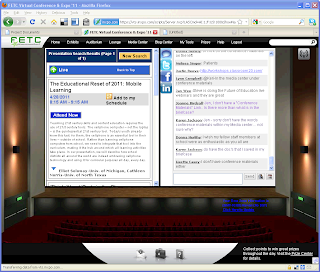
FETC virtual auditorium with live Twitter, Facebook & LinkedIn feed from participants.

Live video streaming feed (right corner) with PPT presentation in the center.

FETC virtual auditorium with live Twitter, Facebook & LinkedIn feed from participants.

Live video streaming feed (right corner) with PPT presentation in the center.
Subscribe to:
Posts (Atom)